


1. The Identity Crisis in Windows Infrastructure: From Static Accounts to Managed Identities
In the intricate ecosystem of enterprise Windows infrastructure, the management of non-human identities—service accounts—has historically represented one of the most significant friction points between operational continuity and cybersecurity hygiene. For decades, systems administrators faced a binary choice that resulted in systemic vulnerability: either manually manage complex passwords for service accounts, a toil-intensive process prone to human error and outages, or configure accounts with “Password Never Expires,” creating static targets for adversaries. The introduction of Group Managed Service Accounts (gMSAs) in Windows Server 2012 marked a paradigm shift in this domain, fundamentally altering how the Active Directory (AD) architecture handles service authentication. To understand the gravity of gMSAs, one must first deconstruct the problems they were engineered to solve and the foundational mechanisms of identity they rely upon.
1.1 The Legacy of Insecurity: Standard Service Accounts
Before the advent of managed service accounts, organizations relied heavily on standard user accounts to run services such as Microsoft SQL Server, Internet Information Services (IIS), and third-party applications. These accounts, indistinguishable in the directory from human users, required the manual synchronization of credentials across multiple servers in a farm. If an administrator changed the password in Active Directory but failed to update the service configuration on one of ten web servers, the application would fail—a scenario known as “service disruption due to credential desynchronization.”
Consequently, operational teams frequently defaulted to dangerous antipatterns. Passwords were set to never expire, often remaining unchanged for years. Even more critically, these accounts were often granted excessive privileges, such as Domain Admin rights, to “ensure things work,” or were added to the local Administrators group on every server they touched. This created a fertile ground for lateral movement attacks. If an attacker compromised a single server running a service with a high-privilege, static-password account, they could extract the credentials and pivot immediately to controlling the entire domain. The gMSA architecture was introduced specifically to dismantle this attack vector by automating the lifecycle of the credential and removing the human element from password management entirely.
1.2 The Managed Service Account (MSA) Evolution
Microsoft’s first attempt to address this, the Standalone Managed Service Account (sMSA), introduced with Windows Server 2008 R2, provided automatic password management but suffered from a fatal architectural limitation: an sMSA could only be installed on a single computer. In the era of virtualization, clustering, and load-balanced web farms, this restriction rendered sMSAs unusable for high-availability services that required the same identity across multiple nodes.
The Group Managed Service Account (gMSA) builds upon the sMSA foundation but introduces a critical innovation: the Key Distribution Service (KDS). By leveraging a centralized mechanism to derive passwords rather than storing them statically, gMSAs allow multiple authorized hosts to retrieve the same password for the same time interval, enabling clustered services to authenticate seamlessly as a single identity without manual synchronization.
2. Architectural Mechanics of the Group Managed Service Account
To teach the concept of gMSAs requires a departure from thinking about passwords as stored strings. In the gMSA model, the password is a transient, calculated value derived from shared secrets. This architecture relies heavily on the Key Distribution Service (KDS) running on Domain Controllers (DCs).
2.1 The Key Distribution Service (KDS) and Root Keys
The KDS is the mathematical heart of the gMSA infrastructure. Unlike a standard user account where the password hash is stored in the unicodePwd attribute of the user object in the Active Directory database (NTDS.DIT), a gMSA password is not stored in a retrievable state by the member servers. Instead, it is computed.
The KDS generates a Root Key, which serves as the cryptographic seed for the entire domain’s gMSA operations. This root key is stored in the Configuration partition of Active Directory, specifically at CN=Master Root Keys,CN=Group Key Distribution Service,CN=Services,CN=Configuration,DC=<Domain>. Because it resides in the Configuration partition, this key replicates to all Domain Controllers in the forest.
The password for any specific gMSA is derived using a combination of:
- The KDS Root Key: The master secret.
- The gMSA Object Identity: Specifically, the account’s Security Identifier (SID) and other immutable attributes.
- Time: The current time interval (typically revolving every 30 days).
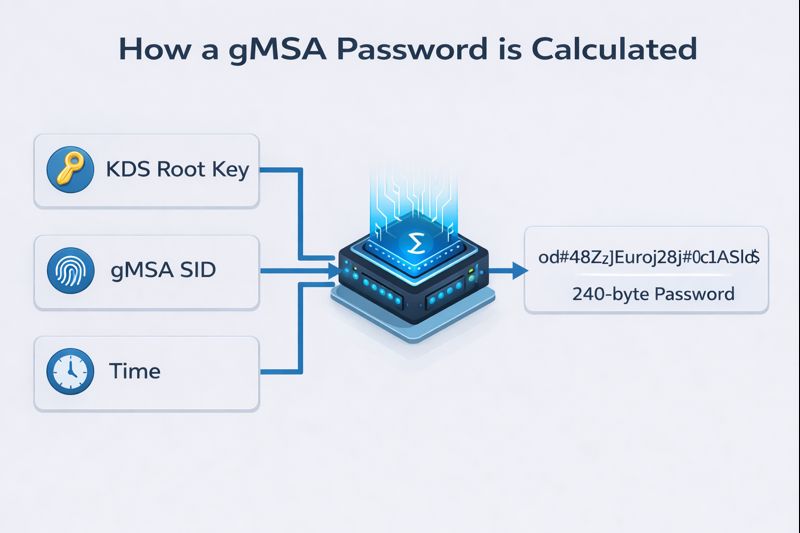
This derivation mechanism is critical to understanding both the utility and the security vulnerability of the system. Because the password is mathematically derived, any Domain Controller that possesses the Root Key can independently calculate the current password for any gMSA when requested by an authorized client. This eliminates the need for DCs to replicate gMSA passwords between themselves; they simply need to replicate the Root Key once.
2.2 The Replication Convergence: The 10-Hour Delay
One of the most common stumbling points for administrators—and a key concept for understanding AD replication consistency—is the mandatory delay upon creating a KDS Root Key. When an administrator runs Add-KdsRootKey, the key is generated, but it is not immediately usable. Microsoft enforces a default 10-hour wait period before the key becomes “effective”.
This delay is an architectural safeguard. In complex, geographically distributed Active Directory forests, replication latency is a physical reality. If a Root Key were effective immediately, a gMSA might be created on a Domain Controller in New York (which has the key) and then attempt to authenticate against a Domain Controller in Tokyo (which has not yet received the key via replication). The Tokyo DC, lacking the seed material, would fail to derive the password, causing an authentication failure.
The 10-hour buffer ensures that the Root Key has ample time to converge across all DCs in the forest, regardless of link speeds or replication topologies. However, for test environments or emergency recovery scenarios where replication is instantaneous (e.g., a single DC lab), administrators can bypass this using the -EffectiveTime parameter to backdate the key’s creation time, tricking the KDS into believing the convergence period has already passed.
2.3 Password Complexity and Rotation Logic
The security of a gMSA is enforced by the operating system’s rigorous password policy, which overrides standard domain policies. The gMSA password is a 240-byte (not bit) randomly generated complex string. This equates to a password length that is practically impossible to crack via traditional brute-force methods or rainbow tables.
Rotation is controlled by the ManagedPasswordIntervalInDays attribute, which defaults to 30 days. Crucially, the gMSA maintains two passwords during the transition period: the current password and the previous password. This ensures that if a service has an active Kerberos Ticket Granting Ticket (TGT) signed with the old password, or if replication latency causes a member server to retrieve the new password slightly later than another, the authentication flow remains uninterrupted. The Domain Controller handles this negotiation transparently.
3. The Deployment Lifecycle: From Creation to Verification
Deploying a gMSA is a multi-stage process that enforces a specific security model: authorization by computer identity. Unlike users who authorize via knowledge (a password), computers authorize via possession (their computer account in AD).
3.1 Step 1: Establishing the Root Key
As discussed, the KDS Root Key is a prerequisite. It is a forest-wide object, meaning you only need to create it once per forest.
- Audit Command: Get-KdsRootKey checks for existence.
- Creation Command: Add-KdsRootKey -EffectiveImmediately (for labs) or Add-KdsRootKey (production).
If this step is skipped, any attempt to create a gMSA will fail with a “Key does not exist” error, as the system cannot establish the derivation seed.
3.2 Step 2: Principals Allowed to Retrieve Password
This is the most critical security boundary in the gMSA architecture. The PrincipalsAllowedToRetrieveManagedPassword parameter defines which computers can request the gMSA’s credentials from the DC. This is a classic area where Broken Access Control can occur if not properly configured.
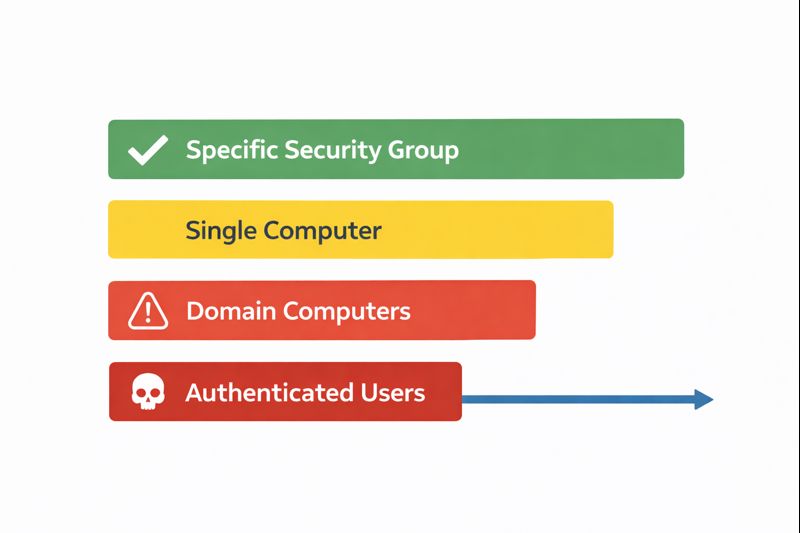
Best practice dictates the use of a Global Security Group rather than adding individual computer accounts directly. This allows for scalable management; as the server farm grows, administrators simply add the new computer account to the group, reboot the member server to update its group membership token, and the server gains access to the gMSA.
Table 1: Scope of Retrieval Permissions
| Permission Scope | Risk Level | Description |
|---|---|---|
| Specific Security Group | Low (Recommended) | Limits retrieval to a defined set of servers (e.g., IIS_Web_Cluster). |
| Single Computer Account | Low | Acceptable for single-server instances, but harder to manage at scale. |
| Domain Computers | Critical | Allows any computer in the domain to retrieve the password. Highly insecure. |
| Authenticated Users | Critical | Allows any user or computer to retrieve the password. Effectively publicizes the credential. |
3.3 Step 3: Account Creation and Attribute Definition
The creation of the account is performed via the New-ADServiceAccount cmdlet. This is where the linkage between the identity and the authorized hosts is established.
New-ADServiceAccount -Name "svc_sqlprod" `
                     -DNSHostName "svc_sqlprod.corp.local" `
                     -PrincipalsAllowedToRetrieveManagedPassword "SG_SQL_Cluster_Nodes" `
                     -ManagedPasswordIntervalInDays 30
It is important to note that the DNSHostName must be unique within the forest. Furthermore, the PrincipalsAllowedToRetrieveManagedPassword attribute operates as a discrete Access Control Entry (ACE) on the AD object. If this list is modified later, the changes must replicate to the DC that the member server is contacting before retrieval will succeed.
3.4 Step 4: Host-Side Installation
The final step occurs on the member server itself (e.g., the SQL or IIS server). The Install-ADServiceAccount command binds the gMSA to the local computer’s LSA.
When this command is executed:
- The local Netlogon service contacts the Domain Controller.
- It presents the computer’s credentials (machine account).
- The DC verifies the computer is a member of the PrincipalsAllowedToRetrieveManagedPassword group.
- If authorized, the DC calculates the gMSA password and sends it to the member server.
- The member server stores this secret in the LSA secret store (LSA Policy), allowing it to be used for service logon.
The Test-ADServiceAccount cmdlet is essential for troubleshooting. A result of True confirms that the entire chain—network connectivity, group membership, KDS health, and local caching—is functional. A result of False often indicates that the computer has not been rebooted after being added to the security group (Kerberos token not updated) or that replication has not occurred.
4. Application Integration Patterns: IIS, SQL, and Containers
The theoretical architecture of gMSAs is realized only when integrated into applications. The implementation nuances differ significantly across technologies, requiring specific configuration steps to ensure the application correctly invokes the managed identity.
4.1 Securing Web Infrastructure: IIS and Application Pools
Internet Information Services (IIS) is a primary consumer of gMSAs, particularly for web farms where stateless frontend servers need to access backend databases or file shares. By running the Application Pool as a gMSA, the web process inherits the domain identity of the gMSA, facilitating Kerberos authentication to backend resources (the “Double Hop” scenario).
Configuration Mechanics:
In IIS, the Application Pool Identity is strictly defined. While standard accounts require a username and password, gMSAs require the username but must have the password field left blank. This blank password acts as a signal to the Windows Service Control Manager (SCM) and IIS to defer credential retrieval to the operating system’s managed service account provider.
PowerShell vs. GUI Configuration:
While the IIS GUI (InetMgr) allows for “Custom Account” selection, automation via PowerShell is preferred for consistency. The WebAdministration module is utilized to modify the processModel attributes of the AppPool.
Import-Module WebAdministration
$AppPoolName = "CorporateIntranet"
$gMSAName = "CORP\svc_intranet$"

# Set Identity Type to 3 (SpecificUser) and clear the password
Set-ItemProperty "IIS:\AppPools\$AppPoolName" -Name processModel.identityType -Value 3
Set-ItemProperty "IIS:\AppPools\$AppPoolName" -Name processModel.userName -Value $gMSAName
Set-ItemProperty "IIS:\AppPools\$AppPoolName" -Name processModel.password -Value ""
Leaving the password value as an empty string “” is the technical trigger for gMSA usage. If a password is provided, IIS will treat it as a standard user account and authentication will fail because the admin cannot know the gMSA’s actual password.
4.2 Database Security: SQL Server and Failover Clusters
SQL Server environments benefit immensely from gMSAs, particularly in Always On Availability Groups (AOAG) or Failover Cluster Instances (FCI). In these scenarios, the service must be able to start on any node in the cluster. With standard accounts, admins had to manually sync passwords on all nodes. With gMSAs, every node in the cluster is added to the retrieval group, ensuring any active node can retrieve the credential.
The Service Principal Name (SPN) Imperative:
For SQL Server to utilize Kerberos (which is required for high-performance authentication and delegation), Service Principal Names must be registered. When a gMSA is used, the SPN must be registered against the gMSA object in AD, not the computer account.
- Correct: setspn -S MSSQLSvc/sql01.corp.local:1433 CORP\svc_sql$
- Incorrect: Registering it to the node name.
If the SPN is missing or incorrect, SQL Server will fall back to NTLM authentication, which prevents the delegation of credentials (double-hop) and exposes the hash to relay attacks. Configuring the gMSA in SQL Server typically involves the SQL Server Configuration Manager tool, where the account name is entered (ending in $) and the password field is left blank.
Permissioning:
It is a common misconception that gMSAs are automatically admins. They are standard users. Explicit permissions must be granted inside SQL Server (Create Logins) and on the filesystem (Data directories) just like any other user account.
4.3 Modernization: gMSAs in Windows Containers
With the rise of DevOps and containerization (Docker/Kubernetes), gMSAs have evolved to support ephemeral architecture. In a Windows container environment, the container host is the entity that retrieves the gMSA password, but the container instance uses it.
The Credential Spec:
Containers do not join the domain in the traditional sense. Instead, a “Credential Spec” file (JSON format) is generated on the host. This file contains the metadata of the gMSA. When a container is launched with this spec, the host’s Local Security Authority (LSA) retrieves the gMSA token and injects it into the container’s session.
Implementation Nuance:
The container host itself must be authorized in the PrincipalsAllowedToRetrieveManagedPassword group. Inside the container, services run as NetworkService or LocalSystem, but when they reach out to the network, they project the identity of the gMSA. This allows a stateless, ephemeral Docker container to authenticate to a legacy SQL Server using robust Active Directory credentials.
5. Threat Modeling and Exploitation: How the Fortress is Breached
While gMSAs eliminate the risk of static passwords, they do not eliminate the risk of credential theft. In fact, they shift the attack surface from “guessing the password” to “abusing the retrieval mechanism” or “compromising the derivation key.” A domain expert must understand these attack vectors to defend against them. Understanding these attacks is part of the broader OWASP Top 10 security landscape.
5.1 The Authorization Attack: Password Retrieval Abuse
The most prevalent attack against gMSAs is the abuse of the legitimate retrieval process. If an attacker compromises a computer that is a member of the allowed retrieval group, they effectively own the gMSA.
Mechanism:
The attribute PrincipalsAllowedToRetrieveManagedPassword grants the computer account the right to read the password blob. An attacker who gains administrative (SYSTEM) privileges on an authorized host can invoke the same APIs the OS uses to request the password.
Forensic Walkthrough:
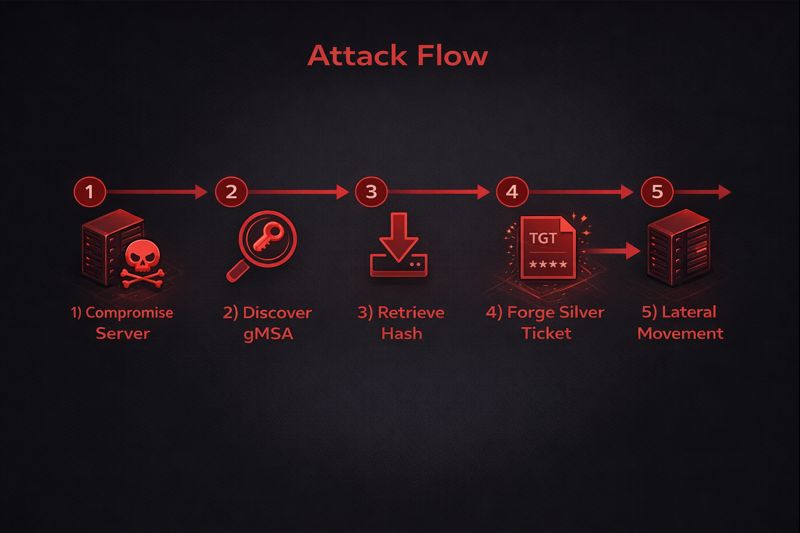
- Compromise: Attacker gains SYSTEM access on WebServer01.
- Discovery: Attacker enumerates services and identifies svc_webapp$ running a critical service.
- Extraction: Using tools like Mimikatz (specifically sekurlsa::logonpasswords) or DSInternals Get-ADServiceAccount, the attacker requests the clear-text password or NTLM hash from the Domain Controller.
- Note: The DC cannot distinguish between the legitimate lsass.exe process requesting the password for the service and a malicious PowerShell script running as SYSTEM requesting it.
- Lateral Movement: The attacker uses the retrieved NTLM hash to perform a Pass-the-Hash (PtH) attack, moving laterally to the Database Server as the gMSA identity.
5.2 The “Silver Ticket” Attack
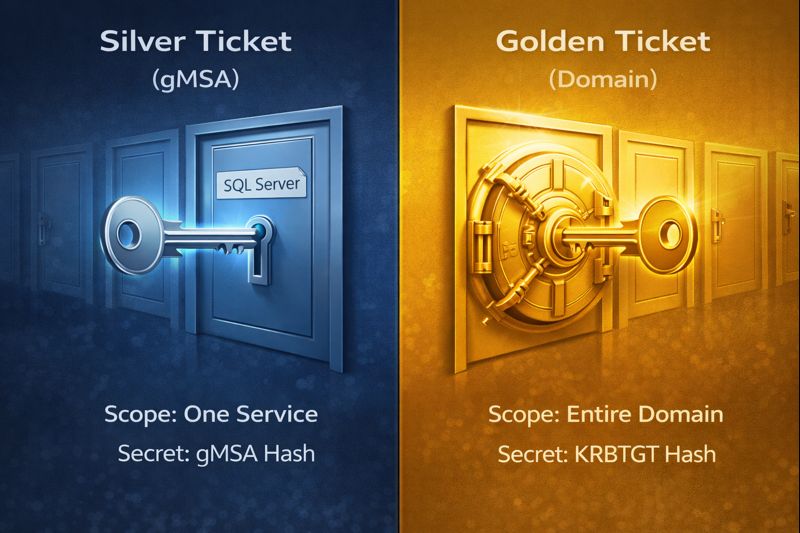
Service accounts are the primary targets for Silver Ticket attacks. A Silver Ticket is a forged Kerberos Service Ticket (TGS) that allows an attacker to authenticate to a service without communicating with the KDC.
The Vulnerability:
Kerberos Service Tickets are encrypted using the service account’s NTLM hash. If an attacker retrieves the gMSA hash (via the method in 5.1), they can forge a ticket.
Why gMSA Silver Tickets are Dangerous:
Even though gMSA passwords rotate every 30 days, creating a moving target, an attacker with persistence on the host can simply re-dump the hash every month. Furthermore, a Silver Ticket can claim the user is anyone—including a Domain Admin. If the gMSA has high privileges on the local machine (e.g., Local Admin), the Silver Ticket grants the attacker total control over that server.
Exploitation Command (Mimikatz):
text
kerberos::golden /user:Administrator /domain:corp.local /sid: /target:sql01.corp.local /service:MSSQLSvc /rc4:<gMSA_NTLM_Hash>This command creates a ticket that tells the SQL Server: “I am the Administrator, and this ticket is valid because it is signed with your own hash.” The SQL Server, trusting its own hash, accepts the ticket blindly.
5.3 The “Golden gMSA” Attack: Compromising the KDS Root Key
This represents a catastrophic failure of the AD trust model. If the KDS Root Key is compromised, the entire gMSA infrastructure collapses.
Mechanism:
As detailed in Section 2.1, gMSA passwords are derived from the Root Key. If an attacker compromises a Domain Controller and dumps the msKds-RootKeyData attribute, they possess the “master mold” for all gMSA keys.
The Mathematical Bypass:
With the Root Key, the gMSA SID, and the time interval, an attacker can calculate the password for any gMSA in the forest, offline. They do not need to query a DC. They do not need to be on an authorized host. They can generate the NTLM hash for the svc_backup account, creating a Silver Ticket to access backups, or the svc_sql account to steal data.
Persistence:
Because KDS Root Keys are rarely rotated (due to the risk of breaking all gMSAs), a compromised Root Key provides indefinite persistence. Even if the gMSA password rotates, the attacker simply recalculates the new one using the compromised root key.
5.4 The Logic Attack: BadSuccessor and dMSA Abuse
With Windows Server 2025, the introduction of Delegated Managed Service Accounts (dMSAs) creates a new logic flaw known as “BadSuccessor.”
The Flaw:
dMSAs allow for account migration, linking a dMSA to a legacy account via the msDS-ManagedAccountPrecededByLink attribute. If an attacker has delegated permissions to create objects in an OU, they can create a malicious dMSA and link it to a Domain Admin account.
The Exploit:
By setting the migration state to “Complete” (simulating a finished migration), the attacker tricks Active Directory into treating the dMSA as the “successor” to the Domain Admin. When the attacker authenticates as the dMSA, the system grants them the privileges of the linked Domain Admin account. This is a privilege escalation vulnerability that bypasses standard admin protections because the dMSA looks like a low-privilege object until the link is processed.
6. Defensive Operations and Auditing: Safeguarding the Managed Identity
Defense against gMSA exploitation requires a shift from password policies to access control monitoring. The password is strong; the access path to it is the vulnerability.
6.1 Principle of Least Privilege in Retrieval
The most effective defense is strict hygiene regarding the PrincipalsAllowedToRetrieveManagedPassword attribute.
- Granularity: Never use broad groups. A specific gMSA should only be retrievable by the specific hosts that run that service.
- Tiering: Adhere to the Tiered Administration model. A gMSA used for Tier 0 (Identity) assets should never be retrievable by a Tier 2 (Workstation) host. If a workstation is compromised, the attacker can retrieve the Tier 0 credential, leading to domain compromise.
- Audit: regularly audit group memberships. If Domain Computers is found in a retrieval group, it is a critical finding.
6.2 Advanced Auditing and Detection (Event IDs)
To detect abuse, security operations centers (SOCs) must ingest and correlate specific Windows Event Logs.
Table 2: Essential Event IDs for gMSA Security
| Event ID | Log Source | Description | Significance |
|---|---|---|---|
| 4662 | Security | An operation was performed on an object | Primary Detection. Logs when the password blob is read. Filter for access to msDS-GroupManagedServiceAccount objects. |
| 5136 | Security | Directory Service object modified | Critical for detecting changes to the retrieval list (PrincipalsAllowedToRetrieve…) or BadSuccessor links (msDS-ManagedAccountPrecededByLink). |
| 5137 | Security | Directory Service object created | Detects the creation of unauthorized dMSA or gMSA objects in the directory. |
| 4004 | KdsSvc | Operational | Verifies KDS Root Key state. Useful for troubleshooting generation issues. |
Detection Logic for Event 4662:
The goal is to differentiate legitimate retrievals from malicious ones.
- Baseline: A computer account (Web01$) retrieving the password for svc_web$ is normal (on startup or rotation).
- Anomaly: A User account (jsmith) or an unauthorized computer (Workstation55$) retrieving the password is a high-fidelity indicator of compromise (IOC) likely indicating a tool like DSInternals or Mimikatz is being used.
6.3 Protecting the KDS Root Key
To prevent the “Golden gMSA” attack, access to the KDS Root Key object must be heavily restricted and monitored.
- SACL: Configure a System Access Control List (SACL) on the Root Key object in the Configuration partition.
- Alert: Trigger an immediate Sev-1 alert if any account other than a Domain Controller reads the msKds-RootKeyData attribute. There is almost no legitimate administrative reason for a user to read the raw private key data.
6.4 Network Segmentation
Implementing network segmentation limits the blast radius of a Silver Ticket attack. If Web01 is compromised and the gMSA hash is stolen, firewalls should prevent that account from authenticating to servers outside its legitimate scope (e.g., the specific SQL server it needs). If the gMSA cannot reach the Domain Controller or other targets via SMB/RPC, the utility of the stolen credential is significantly reduced. This is similar to concepts discussed in our DNS Security guide.
7. Troubleshooting and Forensics
When gMSAs fail, they typically fail silently or with cryptic “Access Denied” messages. Troubleshooting requires tracing the dependency chain.
7.1 Common Failure Modes
“Key does not exist” Error:
- Cause: The KDS Root Key was not created, or the 10-hour replication delay has not passed.
- Fix: Verify key via Get-KdsRootKey. If in a lab, use -EffectiveTime backdating. In production, wait.
“Access Denied” or “Logon Failed” on Install:
- Cause: The computer account is not in the PrincipalsAllowedToRetrieveManagedPassword group, or the computer has not been rebooted to update its Kerberos token (TGT) to reflect the new group membership.
- Fix: Verify group membership. Purge Kerberos tickets (klist purge) or reboot the host.
SPN Registration Failures:
- Cause: The gMSA does not have permissions to write to its own servicePrincipalName attribute, or the admin forgot to register the SPN.
- Fix: Manually register SPNs using Set-SPN -S targeting the gMSA account, not the computer.
7.2 Recovery from Compromise
If a gMSA is suspected of compromise (e.g., a Silver Ticket attack or unauthorized retrieval):
- Immediate Rotation: You cannot easily force a rotation like a user password. However, you can create a new gMSA and swap the service configuration.
- KDS Compromise: If the KDS Root Key is compromised (Golden gMSA), the remediation is painful. You must generate a new Root Key, force replication, and then recreate all gMSAs in the forest to use the new key. The old key must be deleted only after all accounts are migrated. This is a disaster recovery scenario.
8. Conclusion
The Group Managed Service Account represents a sophisticated evolution in Windows identity management. It successfully addresses the operational nightmare of static password synchronization and mitigates the risk of weak, non-rotated credentials. By treating identity as a managed, derived artifact rather than a static string, organizations can achieve high availability and enhanced security for critical workloads like SQL Server and IIS.
However, the “managed” nature of these accounts does not absolve the administrator of security responsibilities; it merely shifts them. The security perimeter moves from the password to the host authorization. If an attacker can compromise a host authorized to retrieve the password, or worse, the KDS Root Key itself, the protections of the gMSA are nullified.
Therefore, the deployment of gMSAs must be accompanied by a rigorous “Teacher’s” understanding of the underlying architecture: the KDS mathematics, the replication logic, and the authorization boundaries. Coupled with aggressive auditing of Event ID 4662 and strict adherence to the Principle of Least Privilege, gMSAs provide a robust defense against modern identity threats. Without these controls, they become merely another high-value target in the directory.
Managed Service Accounts – Interactive gMSA Lab
Visualize how Managed Service Accounts operate, how attackers exploit misconfigurations, and how defenders can properly secure gMSAs in enterprise environments.
Launch Managed Service Accounts Lab →Interactive learning improves understanding of Managed Service Accounts by demonstrating real attack paths and defensive controls in a controlled environment.


